
AgentBlackBox / Records & reports
Verify a task’s recorded history
Review the events behind a task, changes to workspace settings, and the evidence available for export.
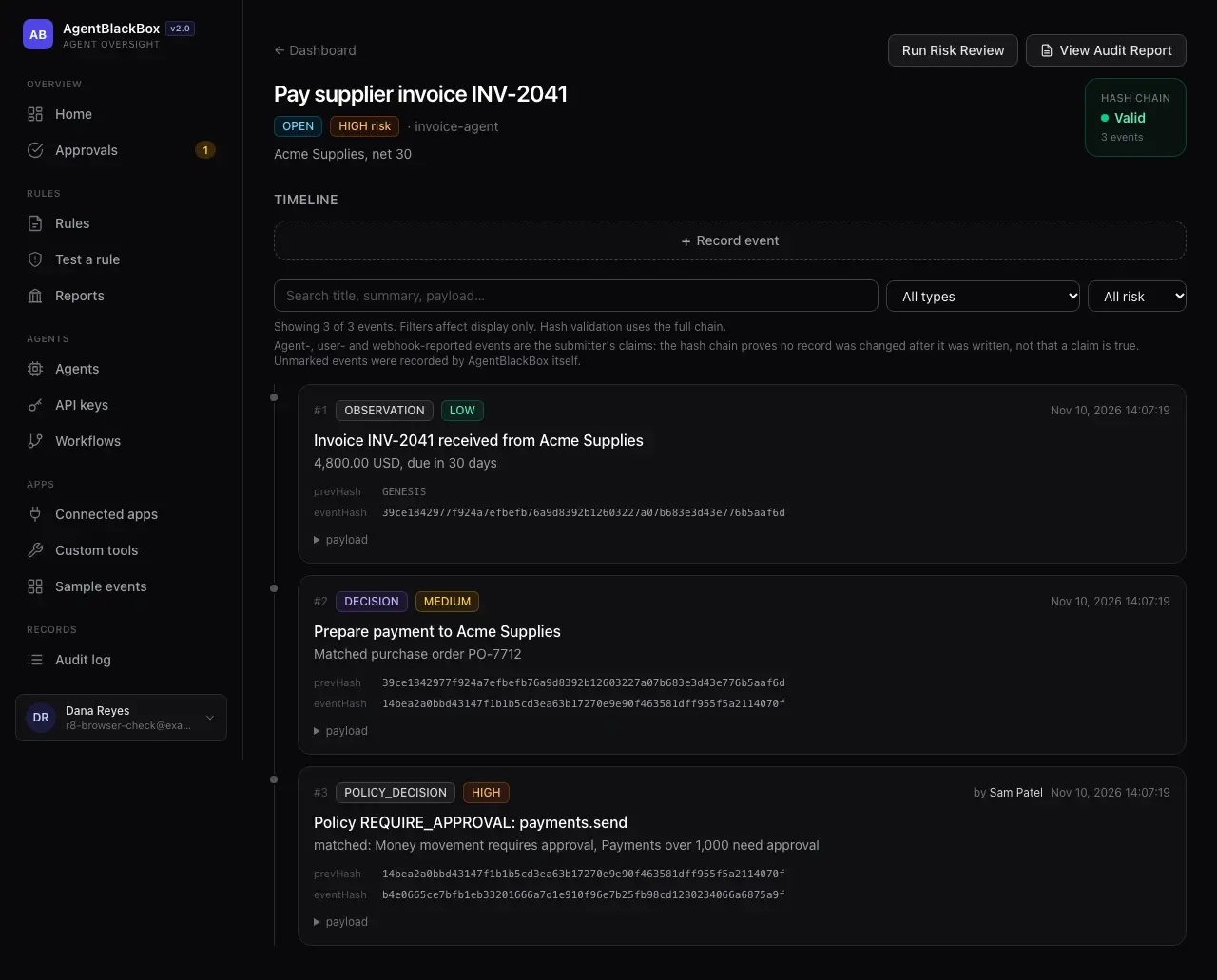
Inspect the event chain
Each recorded event links to the previous event using a SHA-256 hash. A chain check can reveal a changed record or an event removed from the middle. Agents and users can submit claims, so read the original event and its source when interpreting the result.
Seal a range of events
An administrator can create a signed checkpoint. It gives later checks a reference for the tail of the chain as well as the events inside it. Automatic checkpoints depend on scheduled jobs. Public timestamp anchoring is listed as awaiting activation.
Prepare an export
Print a task’s audit report or download its signed JSON. Workspace owners can export workspace records. The HMAC signature is checked with AgentBlackBox’s key. Public-key verification by third parties is on the roadmap.
Review patterns and changes
Reports summarize decisions, approvals and blocked actions over 7, 30 or 90 days. The audit log records who changed a setting, rule, member or key.
KEEP EXPLORING
Teams & pilots
Manage reviewers, company sign-in and the first agents in a pilot workspace.